Plan your entire year at a glance
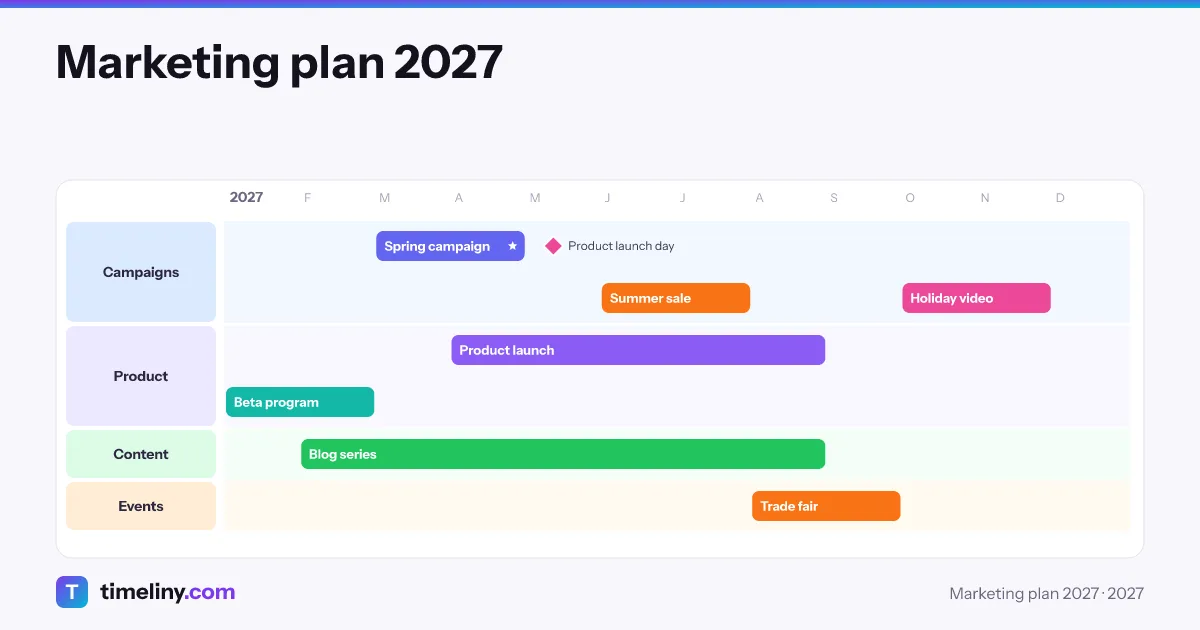
Map projects across 12 months on one visual timeline. Drag to reschedule, group with labels, and share the plan with your team.
How it works
From chaos to clarity in 3 steps
Add your projects
Click a month to add a project. Give it a color and group related projects with row labels.
Visualize your timeline
See all your projects laid out across the months. Overlaps and empty stretches are easy to spot.
Adjust and share
Drag to move or resize projects, undo any change, and export the plan as JPG or PDF.
Features
Powerful features
Everything you need to plan your year with confidence
12-Month Overview
See your entire year at a glance. No more scrolling through endless calendars.
Milestones & exact dates
Mark one-day events and deadlines, or pin projects to the exact day.
Labels, Colors & Flags
Group projects with row labels, color-code them, and mark priorities with a star or a WIP flag.
Undo, Redo & Copy
Undo or redo any change, and copy and paste projects to plan faster.
Shared Team Timelines
Invite up to 20 members on the Team plan to view and edit the same timelines.
Export & Share
Export your timeline as JPG or PDF and share it with stakeholders.
Groups & Access
Group your timelines and give each person read or write access to just their group.
Share with a link
Send a private, view-only link — people without a timeliny account can still open it.
Sticky-Note Comments
People you share with can pin notes right on the timeline and reply to each other.
Use Cases
Built for everyone
From solo founders to growing teams
- Freelancers & Consultants
- See all client projects and deadlines on one timeline before you say yes to new work.
- Project Managers
- Get the big picture view your team needs. Track multiple initiatives.
- Marketing Teams
- Plan campaigns, product launches, and content calendars visually.
- Agencies
- Juggle multiple clients and projects without dropping the ball.
- Startups
- Lay out your roadmap for the year and keep it easy to share.
- Academic Researchers
- Plan research phases, grant deadlines, and publication timelines.
Benefits
Why visual planning works
The benefits of seeing your year at a glance
Crystal Clear Roadmap
No more confusion about what is happening when. Everyone sees the same plan.
Save Planning Time
Stop wrestling with spreadsheets. Update your plan in seconds.
Fewer Surprises
With every project on one timeline, overlapping work and empty months stand out early.
Better Decisions
See the impact of changes instantly. Make informed trade-offs.
New
Paste a list. Get the timeline.
Copy rows from Excel or Google Sheets, or type one item per line. Name, start, end, group. Timeliny draws the bars, sets the milestones and sorts them into groups.
Nothing to add yet.
Reads dates like 12.03.2027, 2027-03-12, Mar 2027 and Q2 2027. Rows it can't read are shown, not dropped.
Grows with your plans
From a personal plan to a shared team timeline
Shared Team Timelines
On the Team plan, invite colleagues with a link. Everyone on the team can view and edit the same timelines, so there is one plan instead of scattered copies.

Many Projects, One View
Put every project on a single timeline with unlimited projects per timeline. Group them with row labels, color-code them, and add notes to each project.

Plan at Any Horizon
Look at a quarter, a full year, or several years ahead. Move between years and keep a today marker in view, whatever way your team works.

Why choose Timeliny?
Why choose Timeliny?
See how we compare to other tools
| Feature | Timeliny | Spreadsheets | Gantt Tools | Task Apps |
|---|---|---|---|---|
| Ready-made 12-month timeline view | ||||
| Drag to move and resize projects | ||||
| Simple, intuitive interface | ||||
| Built for year-level planning, not tasks | ||||
| Undo and redo | ||||
| Export as JPG or PDF | ||||
| Paste a list to build your timeline | ||||
| Ready-made timeline templates | ||||
| Milestones with exact dates | ||||
| Multi-year and quarter views | ||||
| Timeline groups with per-group read/write access | ||||
| Sticky-note comments with replies | ||||
| Share a read-only link, no account needed |
Pricing
Simple, transparent pricing
Choose the plan that fits your needs. No hidden fees, cancel anytime.
Pro
For freelancers and solo founders
- Up to 20 timelines
- Unlimited projects
- JPG & PDF export
- Report link sharing (no account needed)
- Notes & comments with replies
Team
For teams up to 20 members
- Everything in Pro
- Unlimited timelines
- Shared team timelines
- Up to 20 team members
- Report link sharing (no account needed)
- Notes & comments with replies
Pro Lifetime
Launch offer · First 100 buyersPay once, keep Pro.
73 of 100 left
- Everything in Pro, forever
- No subscription
- Includes future Pro features
- Report link sharing (no account needed)
- Notes & comments with replies
Limited to the first 100 buyers.
FAQ
Frequently asked questions
Everything you need to know about Timeliny
Ready to plan your year?
Map your next 12 months — start with a 14-day free trial.